

Eager to get unique content from a source? Well, that will not be easy if you come across some article rewriter tool. But there are some fantastic article rewriting tools that will improve your content quality daily. Bloggers and online marketers use these article rewriting tools all the time. Therefore, with this post, I will help you find the top 5 article rewriter tools to get the unique content. These article rewriting tools will make your job easier every day by helping you bring great content. So, without any further ado, let’s delve into the list.
List of the Top 5 Article Rewriter Tools to Get the Unique Content:
- AI Text Rewriter – WordAi:
The first entry on this list is the most powerful and valuable tool for article rewriting without changing its meaning. Its name is “AI Text Rewriter – WordAi.”

The AI text rewriter of WordAi is a highly recommended shareware tool for rewriting articles because it uses advanced Machine Learning (ML) models to rewrite the entered text as humans. Its AI (Artificial Intelligence) algorithms cut the turnaround time by eradicating the time-consuming and expensive process of creating high-quality content.
This text rewriting tool rewrites everything from scratch without compromising its quality. So, everything in the rewritten text will be different than the original version while remaining true to the original meaning.
From a single source article, the power of this AI text rewriter allows its users to create multiple unique versions of original content. This feature will prove helpful in rapidly scaling your content production. However, to switch to the other generated versions, you can click on the numbered tab appearing at the bottom of the results text box.
Now, let’s discuss the pros and cons of using the AI Text Rewriter of WordAi for unique content creation.
Why should you prefer the AI Text Rewriter of WordAi to create unique content?
- WordAi generates two, five, ten, or even a hundred versions of the entered text during rewriting. So, it is the best rewriter tool to avoid plagiarism-free and paid tools.
- Whether you want to enter text in rich text or HTML form, this tool can rewrite the text from both formats.
- WordAi also contains a rich text editor that allows you to underline, bold and italicize the text.
- Similarly, the rich text editor of WordAi also allows its users to insert hyperlinks, images and videos while writing text.
- With the help of its rich text editor, you can also write listicle content.
- Although there are no different rewriting modes in the AI text rewriter of WordAi, you can set the bar to ‘More Conservative,’ ‘Regular’ and ‘More Adventurous’ points to get the desired results.
- You can choose to add titles and add, remove, or rearrange paragraphs in this tool.
- The reason for adding this rewriting tool in the first place is its ability to identify and add LSI keywords naturally. So, it will maximize the SEO impact of rewritten content.
- The AI text rewriter of WordAi can improve the quality and clarity of writing by making the text grammatical and punctuation error-free.
- You can use the API integration of WordAi to add the rewriting ability of this tool to any platform.
- WordAi provides a 30-day money-back guarantee. So, suppose a user has used the Ai text rewriter of WordAi to rewrite less than ten articles, but he didn’t find it helpful. In that case, he can claim his money back.
- The writing quality of this tool’s rewritten articles is top-notch.
Some caveats of using the AI Text Rewriter of WordAi to create unique content:
- WordAi provides a free trial version of 3 days. After three days, this tool will become a wholly paid tool.
- For using the trial version of this tool, you will have to enter your banking details because this tool will automatically begin the paid plan after three days.
- You cannot upload the document file in this tool, as you will have to type the text from scratch or paste the copied text.
- It can only rewrite the text written in the English language.
- Wordtune – AI-Powered Writing Companion:
The second entry on this list is another highly recommended tool for article rewriting by several content creators. Its name is “Wordtune – AI-powered Writing Companion.”
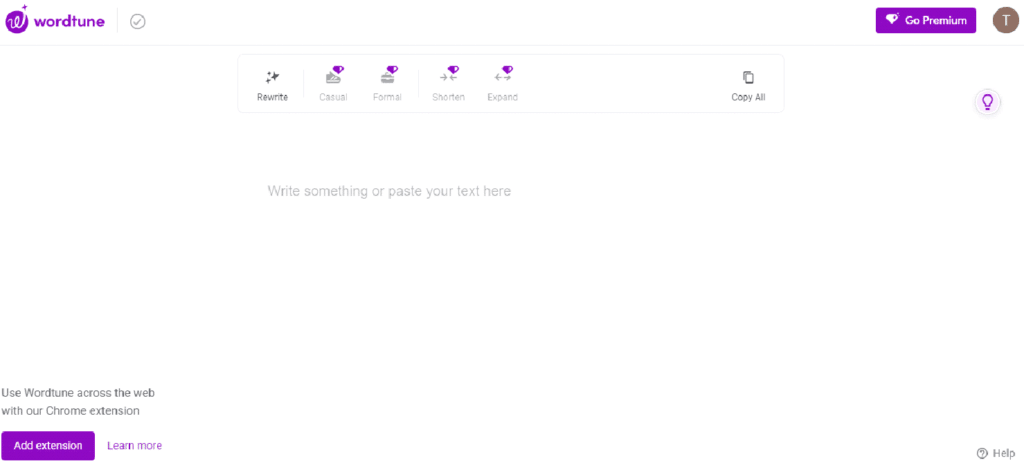
Wordtune is a freemium article rewriter that has revolutionized the way of writing text. The developers of Wordtune have designed it based on language models. That is why it understands the context and semantics of written text and uses its advanced AI tools to rewrite the text.
This article rewriter uses different modes to rewrite the text. This way, it can effectively meet the diverse needs of users. But let’s see each writing mode’s detail to understand this tool better.
- Rewrite – as the name depicts, this rewriting mode is the simplest one because it uses simple vocabulary and AI algorithms to rewrite a piece of text.
- Casual – while dealing with an informal or casual piece of text, users should use this rewriting mode to produce a unique copy.
- Formal – users should use this mode while rewriting legal articles.
- Shorten – according to its name, this mode will work on the conciseness of text to decrease its length.
- Expand – as the name depicts, this mode will add more detail to the entered text to enhance its detail.
Like the AI Text Rewriter of WordAi, this tool can also detect the rewritten text’s grammatical, spelling and punctuation issues. So, suppose a user wants to increase the quality of his writing. In that case, this tool will also be good there.
Now, let’s discuss the pros and cons of using Wordtune to rewrite the articles.
Why should you select the Wordtune – AI-Powered Writing Companion tool to rewrite content?
- The different writing modes of Wordtune are enough to answer the diverse needs of users.
- The writing quality of this tool’s rewritten articles is top-notch.
- If you type content in Microsoft Word, you can integrate the add-in of Wordtune to Microsoft Word to use its services on the go.
- Wordtune also has a chrome extension that allows its users to use the services of Wordtune without accessing the official website.
- With one click, you can copy the entire rewritten text.
Some disadvantages of using Wordtune – AI-Powered Writing Companion tool for creating unique content:
- Wordtune only provides access to one rewriting mode in the free version. So, to get better results, you will have to purchase its premium plan.
- You cannot upload a document file in this tool, as the only way of adding text is either pasting the copied text or typing text from scratch.
- Spin Rewriter:
The third tool on this top 5 article rewriter tools to get the unique content list is another shareware rewriting tool that will rewrite article without changing meaning. Its name is “Spin Rewriter.”
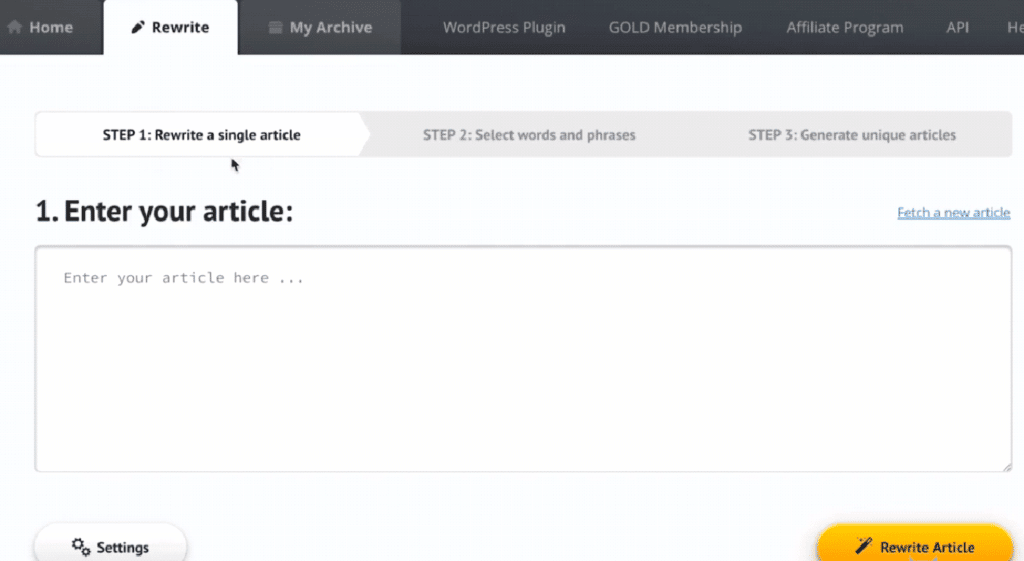
Spin Rewriter is a shareware tool that uses its Artificial Intelligence (AI) capabilities to rewrite content according to users’ needs. Unlike the other tools that work on NLP (Natural Language Processing) algorithm, this tool works on ENL Semantic Spinning technology, allowing it to understand every word’s meaning before rewriting.
As mentioned earlier, it is a shareware rewriting tool. So, it provides a 5-day trial version. But after five days, the paid plan will automatically start because the tool asks for banking details to set up the free trial version.
The article rewriting module of Spin Rewriter works on a three-step procedure
- You begin the procedure by entering the article you want to rewrite.
- The second step will ask you whether you want to perform one-click article rewriting or manually choose the words and phrases to perform article writing.
- In the third step, the tool will show the rewritten article. So, users can create dozens or even hundreds of versions from one copy of the rewritten article.
Let’s discuss the positive and negative points of using the Spin Rewriter to get unique content.
Why should you prefer the Spin Rewriter to rewrite articles?
- The official website of Spin Rewriter provides a comprehensive guide on how to use this tool. So, even if a beginner doesn’t know how to use this tool, he can consult the complete guide section.
- While rewriting articles with Spin Rewriter, users can add stock pictures to their articles with one click.
- Spin Rewriter provides a side-by-side comparison of the rewritten and original text, making it easier to determine the quality of rewriting.
- As mentioned earlier, it is a shareware tool. So, after putting in the banking details, if Spin Rewriter doesn’t fit a user’s needs, he can claim his money back because the tool provides a 30-day money-back guarantee.
Some negative points of using Spin Rewriter to rewrite articles:
- Other than English, Spin Rewriter cannot rewrite the text written in any different language.
- Its paid plan is not worth purchasing because better alternatives are available in exchange for money.
- You cannot upload a document file in this tool because you will have to type the text from scratch or paste the copied text to use this article rewriter.
- Article Rewriter – Free Online Article Spinner:
The fourth tool on this list is the best article rewriter free software. It is the “Article Rewriter – Free Online Article Spinner” of PrePostSEO.

The article spinner (article rewriter) of PrePostSEO is one of the best article rewriter free tools because it allows users to rewrite articles with its three AI modes for free. However, you will have to purchase its premium plan for the fourth AI rewriting mode.
Speaking of AI writing modes, let’s see the details of each mode.
- Simple – this is the default rewriting mode, which rewrites the articles using simple AI algorithms based on simple vocabulary. However, its rewritten wording will be similar to the original text because of its basic algorithms.
- Advanced – as the name depicts, this rewriting mode is a bit more advanced than the simple one. So, it rewrites the articles after detecting the text context using NLP (Natural Language Processing) technology. However, the vocabulary will be pretty similar to the previous rewriting mode.
- Fluency – this mode focuses on creating a fluent piece of article, meaning you will get more readable and human-friendly content with the help of this mode. However, the vocabulary and context detection will be the same as in the previous AI rewriting mode.
- Creative – as the name depicts, this AI rewriting mode uses the help of NLP (Natural Language Processing) and AI (Artificial Intelligence) to detect the context and rewrite the article accordingly. But unlike the first three modes, it uses high-end vocabulary to differentiate the rewritten text from the original version as much as possible. That is why it is only available to premium users.
Now, let’s hover over the advantages and disadvantages of using the article rewriter of PrePostSEO.
Why should you choose the article rewriter of PrePostSEO to get unique content?
- The article rewriter of PrePostSEO uses different rewriting modes to answer users’ needs.
- This tool rewrites the text so that every word stays connected with the context of the text. So, rewriting the article through this tool doesn’t affect the context of the text.
- Like the other tools of PrePostSEO, there are different ways of entering text into this tool. For example, you can
- Copy the pasted text.
- Type the text from scratch.
- Upload the text file from local device storage.
- Upload the document file directly from Google Drive (without downloading the file).
- Unlike most article rewriters and spinners, this tool has no word limit.
- Similarly, there is no limit on how many times you can use this tool.
- To check whether the rewritten text is plagiarism-free or not, users can use the built-in plagiarism checker of PrePostSEO.
- PrePostSEO also provides a chrome extension of this article rewriter. So, users can use the services of this tool without accessing the official website.
- Similarly, users can also use the features of this article rewriter on Android devices.
- This article rewriter can rewrite the text in multiple languages. So, running into language barrier issues in this tool will be a rarity.
Some drawbacks of using PrePostSEO’s article rewriter to create unique content:
- This tool is not entirely free.
- Even after running the text into all four AI rewriting modes, the rewritten text will need some modifications to make the text human-friendly.
- Article Rewriter Change Sentence with Same Meaning – CoderDuck:
The fifth and last tool of this top 5 article rewriter tools to get the unique content list is pretty similar to the previous tool. However, it is not a freemium tool, as it is entirely free. Its name is “Article Rewriter Change Sentence with Same Meaning – CoderDuck.”

CoderDuck’s HYPERLINK “https://www.coderduck.com/article-rewriter” article rewriter is a free tool that works on a one-click rewriting mechanism. It asks the users to enter human-readable text to get human-readable results. So, to get the best results, your text should be high-quality.
Despite being free, this tool promises to keep the rewritten content SEO-friendly. So, even if you want to maintain the keyword structure in rewritten text, this tool will help you.
Let’s discuss some significant advantages and disadvantages of using CoderDuck’s article rewriter.
Why should you use the article rewriter of CoderDuck to rewrite articles?
- There is no need to create an account on CoderDuck to use its rewriting service because it is an entirely free tool.
- CoderDuck provides a collection of free SEO tools. So, if this article rewriter doesn’t satisfy your needs, you can use its pro version, which can rewrite the article in multiple languages.
- To check whether the rewritten content is original or not, you can use the built-in plagiarism checker of this tool.
Some caveats of using CoderDuck’s article rewriter:
- You cannot upload the document file in this tool because it only allows you to paste the copied text or type text from scratch.
- CoderDuck’s article rewriter only works for articles written in the English language.
- Its article rewriting engine is not as powerful as other (discussed) tools. That is the reason for putting this tool in the last spot.
Bottom Line – Which One is the Best?
The quality of content is a significant factor for a successful website. Therefore, if you are looking for the best article rewriting tools, you have come to the right place. In the above post, I have listed five tools to help you quickly get unique content from other websites. But if you want my recommendation, I will recommend the first two picks.